
Assign & Unassign Personnel GeoTracks Mobile

Edits will not be sent to the central database, or visible on other user’s devices, until the user “syncs edits”. Use the My Edits screen to upload or “sync edits”.
To assign & unassign personnel, follow the steps outlined below:
The functionality available to the user is based on the user’s role and permissions.
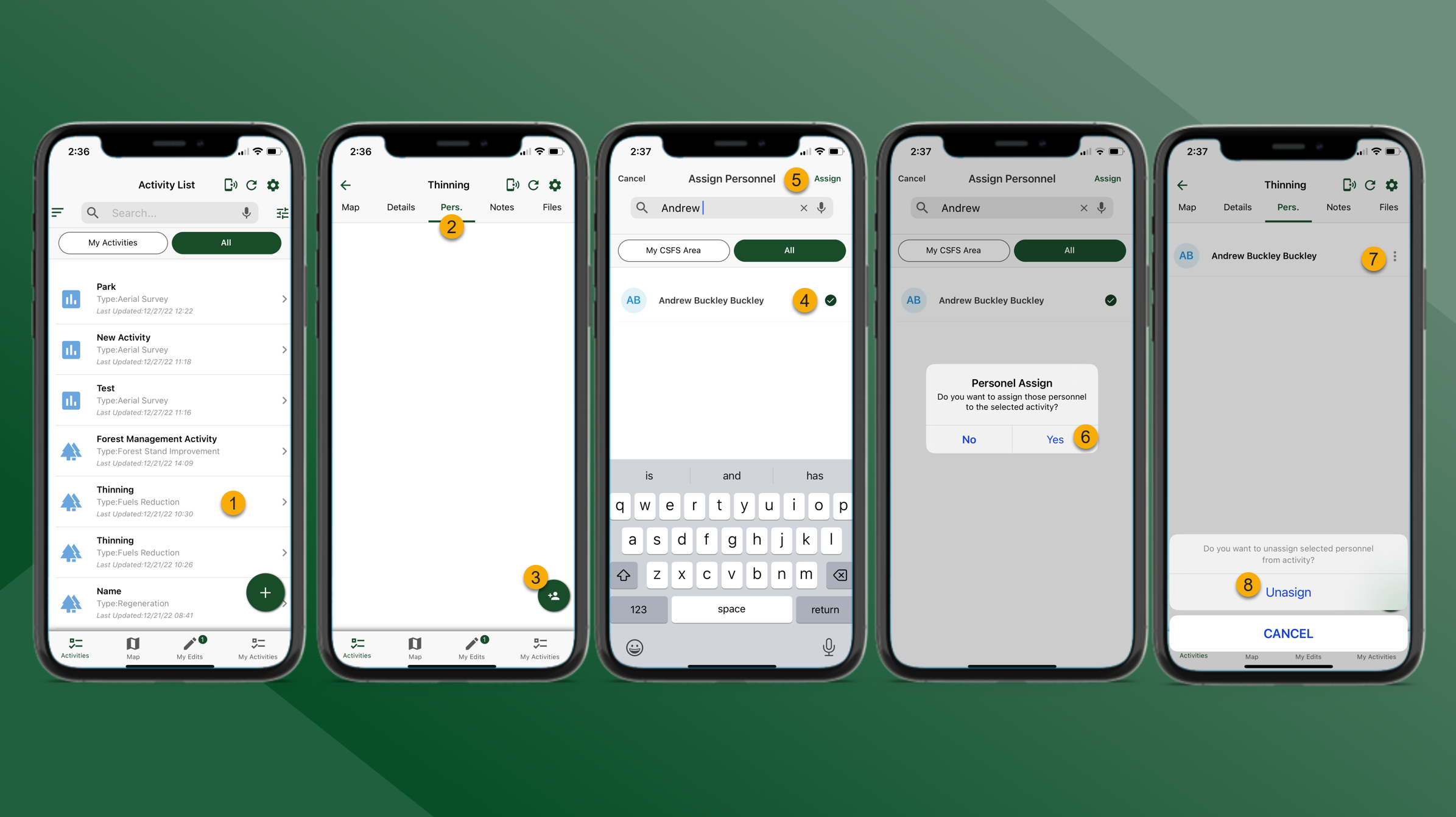
On the Activity List perform a wildcard search for the Activity Name. Tap on the Activity in the Activity List to select the Activity.
Tap the Pers. tab.
Tap Add Personnel in the lower right corner
Use the Search bar and tap to select the preferred Personnel. One or more personnel can be selected.
Tap Assign to assign the selected personnel to the Activity.
Tap Yes to confirm the personnel will be assigned to the Activity.
To Unassign Personnel tap
next the preferred Personnel and tap Unassign.
The selected Personnel will be unassigned from the Activity.